★★★★★86% Open Rate
We are finally getting real conversations and real downloads. Advazon built a cold email engine that reached 20,000+ attorneys with an 86% average open rate.
N
Nick
Founder · Vikk.ai · LegalTech SaaS
If your cold emails are landing in spam, the problem usually isn’t your copy. It’s your infrastructure.
Many businesses invest time in writing better subject lines, personalizing emails, and buying quality lead lists. Yet they still struggle with low open rates and almost no replies. In most cases, the real issue is a weak or poorly configured Cold Email Infrastructure.
A strong infrastructure is the foundation of every successful cold email campaign. Without it, even the best outreach strategy will fail.
In this guide, you’ll learn what cold email infrastructure is, why it matters, and how to build a system that consistently reaches your prospects’ inboxes.
Cold email infrastructure refers to the complete technical setup that supports your outbound email campaigns. It includes everything required to send emails safely while maintaining a strong sender reputation.
A professional setup typically includes:
Think of it like building a highway before driving a car. Without the right infrastructure, your emails have nowhere reliable to go.
Email providers like Google and Microsoft analyze hundreds of signals before deciding whether your email belongs in the inbox or spam folder.
These signals include:
Without a properly configured cold email infrastructure, your emails are more likely to be filtered before your prospects even see them.
This means:
Investing in infrastructure first saves both time and money later.
Avoid sending cold emails from your primary business domain.
Instead, create secondary domains that closely match your brand.
For example:
This protects your main domain while allowing you to scale outbound campaigns safely.
Create multiple business inboxes for each sending domain.
Rather than relying on one email account, distribute sending across several inboxes.
Example:
This approach reduces risk and creates healthier sending patterns.
Authentication is one of the most important parts of Cold Email Infrastructure.
SPF verifies that your server is allowed to send emails.
DKIM digitally signs each message to prove it hasn’t been altered.
DMARC tells receiving servers how to handle unauthenticated emails.
Without these records, even legitimate campaigns may end up in spam.
A brand-new inbox has no reputation.
Sending hundreds of cold emails on day one is one of the fastest ways to damage that reputation.
Professional deliverability specialists gradually increase sending volume while generating positive engagement through inbox warm-up.
A healthy warm-up period usually lasts between two and four weeks depending on your goals.
Patience during this stage pays off with significantly better inbox placement.
Email providers prefer predictable behavior.
Instead of sending 500 emails one day and none the next, spread your volume evenly.
For example:
Consistency helps establish trust with mailbox providers.
Setting up your infrastructure isn’t enough.
You also need continuous monitoring.
Important metrics include:
Monitoring allows you to identify problems before they affect your campaigns.
Professional tools such as Google Postmaster Tools, Microsoft SNDS, MXToolbox, GlockApps, and Mail-Tester can help evaluate email health.
Many businesses unknowingly hurt their deliverability by making avoidable mistakes.
Some of the most common include:
Your main website domain should support your business—not absorb the risks of cold outreach.
Protect your brand by separating outbound infrastructure.
Missing SPF, DKIM, or DMARC records immediately reduce trust with receiving mail servers.
Authentication should never be optional.
Scaling before warming inboxes often results in spam placement and long-term reputation damage.
Growth should always be gradual.
Even the best Cold Email Infrastructure cannot fix bad data.
Always verify email addresses and remove invalid contacts before launching campaigns.
Mailbox providers pay attention to engagement.
Positive replies improve reputation, while ignored conversations reduce campaign effectiveness.
Growing outbound teams rarely rely on a single domain or inbox.
Instead, they build scalable systems.
A common setup might include:
This approach allows businesses to send thousands of emails each month while protecting deliverability.
The goal isn’t simply sending more emails—it’s maintaining consistent inbox placement as volume grows.
Many marketers spend hours improving email copy while overlooking technical fundamentals.
The truth is simple.
If your email never reaches the inbox, nobody will read your carefully written message.
Deliverability comes first.
Copywriting comes second.
Personalization comes third.
When these three elements work together, response rates improve dramatically.
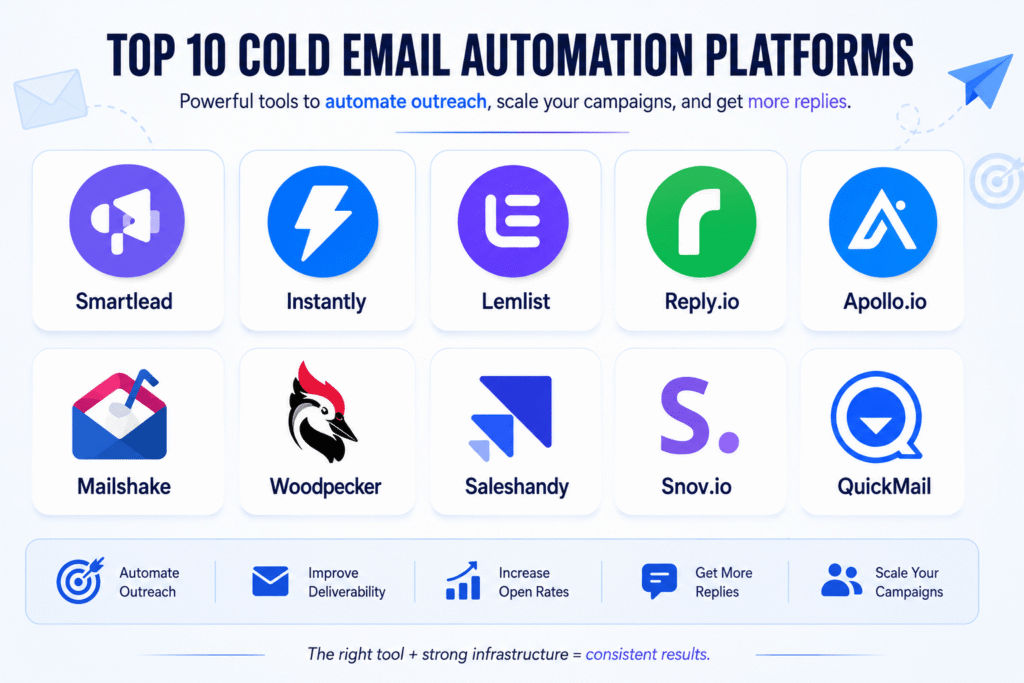
Finding the right cold email software can make the difference between landing in your prospect’s inbox or getting filtered into spam. In 2026, the best platforms do much more than send emails—they help improve deliverability, automate follow-ups, personalize outreach, and track campaign performance.
After evaluating features, usability, scalability, and deliverability capabilities, here are ten of the best cold email software solutions available today:
The best cold email software depends on your goals. If you’re scaling thousands of emails per month, platforms like Smartlead or Instantly are strong choices. For personalized outreach, Lemlist stands out, while Apollo.io is ideal if you also need built-in lead data.
Remember, even the best software cannot guarantee results without a properly configured cold email infrastructure. Authenticating your domains, warming up inboxes, verifying email lists, and maintaining a healthy sender reputation are essential for consistent inbox placement.
Choose a platform that fits your workflow, but always prioritize deliverability before increasing sending volume. The right combination of software and infrastructure will help you generate more replies, book more meetings, and scale your outbound campaigns successfully.
Choosing the right cold emailing platform can directly impact your outreach performance, inbox placement, and sales pipeline growth. While many tools offer email automation, Saleshandy, Apollo.io, and Instantly.ai are three popular platforms with different strengths.
This comparison breaks down their pricing, email accounts, databases, deliverability features, AI capabilities, and CRM options to help you choose the right solution.
| Feature | Saleshandy | Apollo.io | Instantly.ai |
| Pricing | $25/month (Flat fee) | $49/month per user | $37.60/month (Flat fee) |
| Email Accounts | Unlimited accounts on all plans | Limited based on plan tier | Unlimited email accounts |
| B2B Database & Verification | 852M+ contacts with real-time verification | 210M+ contacts with sales intelligence database | 450M+ contacts (separate lead package required) |
| Email Verification | A-grade verification, no credits charged for unverified emails | Credits charged per verification action | Lead database verification available separately |
| Warm-up Features | Unlimited warm-up, sender rotation, inbox placement test, ESP matching, bounce detection | Basic warm-up (new beta), manual inbox rotation, limited testing features | Unlimited warm-up, sender rotation, IP rotation on higher plans |
| AI Email Features | AI sequence generation, A-Z variant testing, AI reply categorization | AI sequence builder, personalization, lead scoring | AI sequence writer, A-Z testing, advanced AI features on higher plans |
| Built-in CRM | Included with Kanban pipeline and activity timeline | Included with full deal management features | Included with basic CRM workflow |
Saleshandy is a strong option for businesses looking for affordable cold email automation with unlimited inbox management. Its deliverability-focused features make it suitable for agencies and teams running multiple campaigns.
Apollo.io stands out because of its massive B2B database and sales intelligence features. It is ideal for companies that need prospecting, lead enrichment, and outreach in one platform.
Instantly.ai is popular among agencies and high-volume senders because of its unlimited email accounts, simple campaign management, and scalable infrastructure.
The best choice depends on your outreach strategy:
However, regardless of the platform you choose, success depends on having a proper Cold Email Infrastructure, verified lead data, domain authentication, and a strong deliverability strategy. A good tool helps you send emails, but a reliable system helps you consistently reach the inbox.
Saleshandy is a popular cold email outreach platform designed for businesses, agencies, and sales teams that want to automate email campaigns, manage multiple inboxes, and improve deliverability. The platform offers different pricing tiers based on email volume, active prospects, and advanced outreach features. (Saleshandy)
Saleshandy pricing starts at $25/month on annual billing for the Outreach Starter plan. Higher plans are designed for teams that need larger sending capacity, more prospects, and advanced automation features. (Saleshandy)
| Plan | Price (Annual Billing) | Best For | Monthly Email Limit | Active Prospects |
| Outreach Starter | $25/month | Beginners & solo founders | 6,000 emails/month | 2,000 prospects |
| Outreach Pro | $69/month | Growing teams & agencies | 150,000 emails/month | 30,000 prospects |
| Outreach Scale | $139/month | Large outreach campaigns | 240,000 emails/month | 60,000 prospects |
| Outreach Scale Plus | Higher-tier plan | Enterprise-level outreach | 300,000+ emails/month | 100,000+ prospects |
The Starter plan is suitable for individuals who are testing cold email outreach. It includes unlimited email accounts, email warm-up, AI-powered sequences, basic sender rotation, and limited verification credits. (Saleshandy)
However, the sending limit is lower, making it less suitable for agencies or companies running multiple campaigns.
The Pro plan is where Saleshandy becomes more useful for professional outbound campaigns. It increases sending capacity significantly and adds advanced sequence features, CRM integrations, and more verification credits. (Saleshandy)
This plan is a good fit for B2B agencies, startups, and sales teams managing multiple campaigns.
The Scale plan is built for companies that need higher-volume outreach. It includes larger prospect limits, more verification credits, team features, sender rotation improvements, and advanced deliverability options. (Saleshandy)
This is better suited for agencies managing campaigns for multiple clients.
Saleshandy can reduce the complexity of cold email automation, but pricing is only one part of successful outreach. A strong Cold Email Infrastructure, verified lead lists, proper domain authentication, and deliverability monitoring are still required to achieve consistent inbox placement.
For most B2B agencies and professional outbound teams, the Pro or Scale plans provide the best balance between cost and scalability.
Apollo.io is one of the most popular B2B sales intelligence and cold email outreach platforms. It combines a large contact database, email sequencing, prospecting tools, and sales engagement features in one platform.
Apollo.io pricing is designed for different types of users, from individuals testing outbound campaigns to sales teams managing large-scale prospecting operations. The cost depends on the number of users, database credits, and advanced sales features required.
| Plan | Price (Approx.) | Best For | Key Features |
| Free Plan | $0/month | Beginners & testing | Limited credits, basic search filters, email sequences |
| Basic Plan | Around $49/user/month | Individual sales professionals | More database credits, email automation, advanced filters |
| Professional Plan | Around $79/user/month | Sales teams & growing companies | Unlimited email sequences, advanced analytics, AI features |
| Organization Plan | Custom pricing | Enterprise teams | Advanced controls, security, and team management |
The Free plan is suitable for users who want to explore Apollo.io before upgrading. It provides access to the B2B database, basic prospect searches, and limited outreach features.
However, the monthly credit limits make it difficult for businesses running consistent cold email campaigns.
The Basic plan is designed for sales professionals who need more prospecting power. It includes access to advanced search filters, contact data, email sequences, and additional export credits.
This plan works well for freelancers, consultants, and small sales teams.
The Professional plan is built for teams that need scalable outbound sales operations. It includes more automation features, advanced reporting, AI-assisted workflows, and better campaign management.
Companies running regular B2B outreach campaigns usually benefit most from this plan.
The Organization plan is designed for larger companies with multiple sales teams. It includes enterprise-level controls, security features, advanced integrations, and dedicated support.
Apollo.io is a powerful tool because it combines lead database, verification, and outreach automation in one platform. However, software alone does not guarantee cold email success.
A strong cold email infrastructure, verified email lists, domain authentication, inbox warm-up, and proper campaign strategy are still essential for achieving higher deliverability and better reply rates.
For businesses focused on B2B lead generation, Apollo.io is a strong choice when prospect data and outreach automation need to work together.
Instantly.ai is one of the leading cold email outreach platforms for agencies, startups, and sales teams. It’s designed to help businesses scale outbound campaigns with unlimited email accounts, automated warm-up, and AI-powered email sequences. Unlike many competitors, Instantly focuses heavily on deliverability and campaign automation, making it a popular choice for high-volume cold email outreach.
Instantly.ai offers several pricing plans based on outreach volume, AI features, and advanced deliverability tools. Whether you’re a solo founder or a growing agency, there’s a plan designed to match your needs.
| Plan | Price (Approx.) | Best For | Key Features |
| Growth | $37.60/month | Individuals & startups | Unlimited email accounts, warm-up, campaign automation |
| Hypergrowth | $97.60/month | Growing sales teams | Higher sending limits, advanced analytics, AI features |
| Light Speed | $358/month | Agencies & enterprise | Maximum scalability, team collaboration, premium support |
The Growth plan is perfect for freelancers, founders, and small businesses starting with cold email outreach. It includes unlimited email accounts, automated inbox warm-up, campaign management, sender rotation, and performance tracking.
This plan is ideal for users who want to build a reliable outbound system without paying per inbox.
The Hypergrowth plan is designed for businesses running larger outreach campaigns. It includes higher campaign limits, advanced reporting, AI-powered email writing, A/B testing, and additional deliverability features.
Sales teams and agencies managing multiple clients often choose this plan for its scalability.
The Light Speed plan is built for enterprise users and agencies sending high volumes of cold emails. It offers premium support, enhanced collaboration tools, advanced campaign management, and maximum sending capacity.
This plan is best suited for organizations that need to manage large outbound operations efficiently.
Instantly.ai is an excellent platform for scaling outbound sales, but software alone won’t guarantee results. A well-configured Cold Email Infrastructure, authenticated sending domains, inbox warm-up, verified lead lists, and continuous deliverability monitoring are essential for achieving consistent inbox placement.
For most startups, agencies, and B2B sales teams, the Hypergrowth Plan offers the best balance of features, scalability, and value.
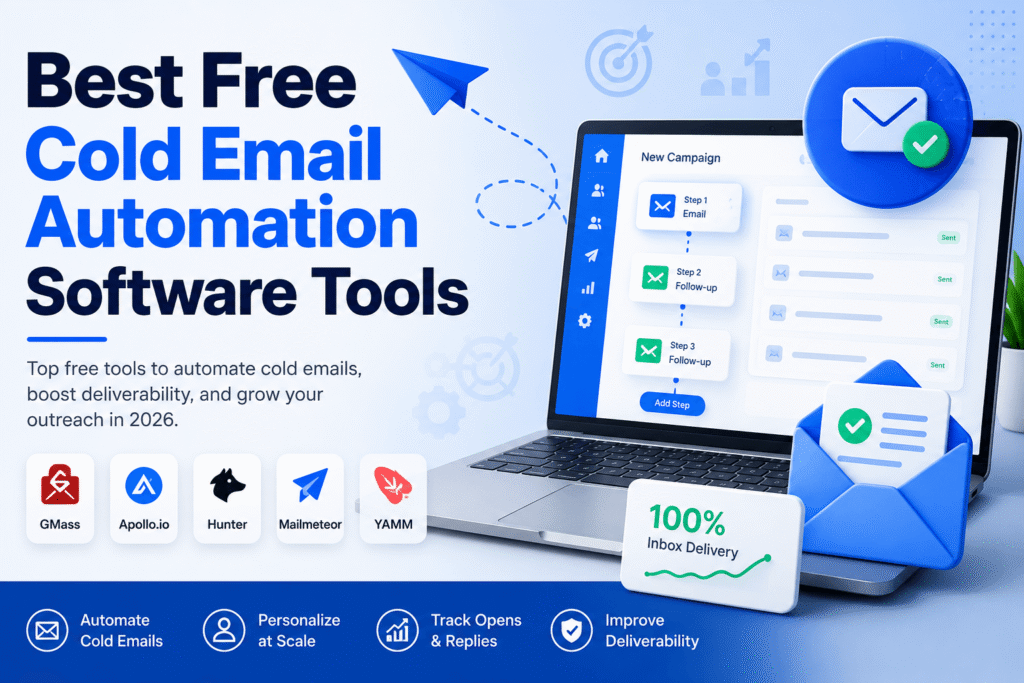
Finding reliable cold email automation free tools can be challenging. Many platforms advertise free plans, but most come with limitations such as sending caps, limited automation, or restricted features. Still, if you’re launching your first outbound campaign or testing a new offer, several free tools can help you get started without a large investment.
Cold email automation software helps you send personalized outreach emails at scale. Instead of manually sending each message, these tools automate follow-ups, personalize emails using variables like first name or company, and track opens, clicks, and replies.
Unlike email marketing platforms, cold email tools are built specifically for one-to-one B2B outreach while focusing on deliverability and sender reputation.
GMass works directly inside Gmail and is one of the easiest tools for beginners. The free version lets you automate basic campaigns, personalize emails, and schedule follow-ups with daily sending limits.
Apollo’s free plan combines a B2B contact database with basic email sequencing. It’s a great option if you need both lead generation and outreach in one platform.
Hunter offers a free tier that includes email finding, verification, and limited cold email campaigns. It’s ideal for freelancers and small businesses.
Mailmeteor integrates with Gmail and Google Sheets, allowing you to send personalized email campaigns without complicated setup.
YAMM is another Gmail-based solution that’s perfect for simple outreach campaigns and personalized email merges.
Free plans are excellent for learning, but they usually include restrictions such as:
As your outreach grows, you’ll likely need a paid platform like Smartlead, Instantly.ai, or Saleshandy to unlock higher sending limits and advanced deliverability features.
Even the best cold email automation free software cannot guarantee inbox placement if your technical setup is weak.
Before launching any campaign, make sure you have:
These best practices help build a healthy sender reputation and improve deliverability over time.
Here are 6 SEO, AEO, and GEO-optimized FAQs for your article targeting the keyword “Cold email automation free”:
The best free cold email automation software depends on your needs. Popular options include GMass, Apollo.io, Hunter Campaigns, Mailmeteor, and YAMM. These tools offer free plans for sending personalized cold emails, although they come with usage limits.
Yes. Several platforms allow you to automate cold email campaigns for free. You can schedule follow-ups, personalize messages, and track basic campaign performance. As your outreach grows, you may need a paid plan for higher sending limits and advanced automation.
Free cold email tools are a good starting point for freelancers, startups, and small businesses. They help you test outreach campaigns before investing in premium platforms. However, businesses running large-scale B2B campaigns often require advanced deliverability and automation features.
Yes. Even the best free cold email automation software cannot guarantee inbox placement without a proper Cold Email Infrastructure. Configuring SPF, DKIM, DMARC, warming up inboxes, and verifying email lists are essential for improving email deliverability.
Most free plans include daily sending limits, basic automation workflows, fewer integrations, limited reporting, and restricted AI features. These limitations are suitable for testing but may not support long-term outbound growth.
You should consider upgrading when you’re managing multiple campaigns, sending higher email volumes, or need advanced features like inbox rotation, AI personalization, team collaboration, and detailed analytics. Paid platforms also offer better scalability for growing outbound sales teams.
Most companies don’t fire their cold email agency because the emails stopped working. They fire the agency because nobody asked the right questions before signing the contract. By the time open rates crater and the domain lands on a blocklist, the damage is already done, and rebuilding sender reputation takes longer than the campaign that broke it.
If you’re evaluating vendors right now, this is the checklist we wish more buyers used. It’s built from the questions that separate an agency that treats your inbox like a rented apartment from one that treats it like something they actually have to maintain.
A cold email agency isn’t just a copywriting service that happens to send emails. At minimum, the job covers four things: building and warming sending infrastructure, sourcing and verifying a prospect list that matches your ideal customer profile, writing sequences that get replies instead of just opens, and reporting on results in a way you can actually act on. Some agencies stop at the copywriting and hand you a spreadsheet of leads bought from a third-party tool. Others own the entire stack, from domain registration to the calendar link a prospect clicks. Figure out which one you’re hiring before you sign anything.
In practice, the full-stack version looks like this: a strategist maps your ICP and messaging angle in week 1, infrastructure gets registered and warmed over the following month, and by week 5 or 6 you’re seeing sequences go out to a verified list with someone checking deliverability metrics daily. The version where an agency skips straight to sending is the version where you find out about a domain problem 3 weeks in, after the damage is already done.
This is the single biggest predictor of whether a campaign survives past month one. A competent agency never sends cold email from your primary business domain. They register secondary domains built specifically for outbound, so a deliverability problem never touches the domain your invoices and support emails come from. You’ll want to know how many domains they set up, how many mailboxes per domain, and what the warmup ramp looks like week by week. If the answer is vague, or if they say they’ll start sending at full volume right away, that tells you how this engagement ends.
You don’t need to become an email infrastructure expert to hire well, but the agency does. A good test is asking them to walk you through how they’ll configure authentication records for your domains and what DMARC policy they’ll set and why. Gmail and Yahoo now enforce bulk sender requirements that make this non-negotiable: authentication failures get mail rejected outright, not filtered to spam. An agency that can’t explain this in plain language probably isn’t configuring it correctly either. We’ve written a more technical breakdown of SPF, DKIM, DMARC, and domain warmup if you want to check their answers against a reference.
A list of 10,000 loosely matched contacts will always underperform a list of 800 that actually fit your ideal customer profile. It’s worth pinning down where the data comes from, whether it’s verified before it ever touches a sequence, and how the agency defines your ICP in the first place. Bounce rates above 2% start damaging your sender reputation, and above 5% most sending platforms will throttle or suspend the account outright. If an agency can’t tell you their typical bounce rate on past campaigns, they either don’t track it or don’t want to share it.
Open rate is the easiest metric to report and the least useful one to optimize for, especially now that Apple Mail Privacy Protection and similar features inflate opens artificially. The agency should be able to tell you what it actually measures and reports weekly: reply rate, positive reply rate, meetings booked, and where those meetings land in your pipeline. A serious agency will tell you upfront what a realistic reply rate looks like for your industry and won’t promise a number before it has seen your offer and ICP.
Some agencies staff every account with the same two people who close the sales calls. Others subcontract execution to whoever’s available that week. It’s worth asking directly whether the team that pitched you is the team running your campaign, and how many other accounts that person is juggling. This matters more than it sounds like it should. Infrastructure problems get caught early by someone paying close attention, and missed by someone spread across 15 accounts.
Cold email agency pricing generally falls into three bands. Smaller or boutique operators run somewhere around $1,900 to $3,500 a month. Mid-market agencies with more infrastructure and a dedicated strategist tend to land between $4,000 and $8,000. Premium retainers with multi-channel add-ons or larger teams run higher still. On top of the retainer, budget separately for infrastructure costs: domains, mailboxes, verification tools, and sending software typically add another $500 to $2,000 a month depending on scale. Ask what’s bundled into the retainer and what shows up as a separate line item later.
Cold email operates under CAN-SPAM in the US, and GDPR or similar regional rules apply if you’re prospecting into the EU or UK. A compliant setup includes a real return address, an honest subject line, and a working one-click unsubscribe link on every message, not a mailto request buried in a footer. Gmail and Yahoo both require RFC 8058 one-click unsubscribe headers for bulk senders, and unsubscribe requests need to be honored within a couple of days, not weeks. Ask how the agency handles suppression lists across campaigns. A prospect who opts out of one sequence should never end up in a different sequence 3 months later because the suppression list didn’t carry over. It sounds like a small detail until a prospect complains and it turns into a spam report that follows your domain.
A short list you can bring into any discovery call:
We built this checklist from the questions we get asked on discovery calls, and honestly, from watching what happens when companies come to us after a bad experience with a previous vendor. We see the same pattern repeatedly: domains that were never warmed properly, lists pulled once and never re-verified, reporting that stopped at emails sent and nothing beyond that. Fixing that damage usually takes longer than setting things up correctly would have taken in the first place.
Our approach is to own the full stack: infrastructure setup and domain warmup, verified list building tied to your actual ICP, and reporting that tracks replies and pipeline, not just opens. If your current setup needs a second opinion before you commit to a renewal, an email deliverability audit is a reasonable first step, whether or not you end up working with us.
Expect 4 to 6 weeks before a new domain is fully warmed and sending at volume, and most agencies won’t call a campaign statistically meaningful until it’s run for 8 to 12 weeks. Anyone promising booked meetings in the first 2 weeks is either sending from an already-warm domain you should ask about, or skipping steps that will cost you later.
It depends on whether you have someone who can own infrastructure, list building, and copywriting at the same time, and keep doing it as deliverability rules change. Teams with a dedicated SDR who has time to learn the technical side can run it in-house successfully. Teams stretching a marketer or founder across 5 other priorities tend to get better and faster results from a specialist.
This varies heavily by industry, list quality, and offer, but a healthy B2B campaign with a well-matched ICP typically lands somewhere between 3% and 8% for total replies, with a smaller slice of those being positive. Any agency quoting a specific number before reviewing your market and offer is guessing.
Most full-service agencies build the list as part of the engagement, using your ICP criteria and a verification step to remove invalid or risky addresses. If an agency asks you to supply the list yourself with no input on targeting, ask what happens to deliverability if that list is outdated or poorly matched.
This should be spelled out in writing before you sign. Reputable agencies transfer ownership of domains and mailboxes registered under your name, since they were purchased for your campaign in the first place. Pin this down before you sign, not during an offboarding dispute.
Domain warmup and list building take real time, so most reputable agencies ask for at least a 3-month commitment to give the campaign room to work. Anything beyond that should come with a clear early termination clause and defined terms on what happens to your infrastructure if you leave. Be cautious of a 12-month contract with no exit option, especially from an agency you have not worked with before.
Choosing a cold email agency comes down to one question more than any other: can they explain, in specific and verifiable terms, how they protect your domain while getting you replies? Vague answers about proven systems and proprietary processes usually mean there isn’t much substance underneath. Specific answers about warmup schedules, bounce rates, and reporting mean you’re talking to people who’ve actually done this before and know what breaks when it’s done wrong. If an agency cannot answer these questions clearly on a first call, that is useful information too. Move on to the next one.
Cold email infrastructure is what separates a campaign that books calls from one that burns your domain in two weeks.
We have built and audited cold email infrastructure for over 200 B2B campaigns at Advazon. The same failures appear every time: one inbox carrying 600 sends per day, no secondary domains, DMARC set to none, warmup skipped entirely. The copy was fine. The infrastructure was not.
This guide covers the exact setup process we use for every client.

Cold email infrastructure is the technical foundation that determines whether your emails reach the inbox or go to spam. It includes your sending domains, mailboxes, DNS authentication records, warmup protocol, and inbox rotation system.
Without it, no amount of good copywriting saves your campaign.
Here is what we see when clients come to us with deliverability problems:
Every one of these is an infrastructure problem. None of them are copy problems.
The first rule of cold email infrastructure is never send from your primary domain.
If acmecorp.com gets blacklisted, your customer emails, website contact forms, and transactional messages stop landing. The damage goes far beyond the campaign.
Register dedicated secondary sending domains instead. Examples for acmecorp.com:
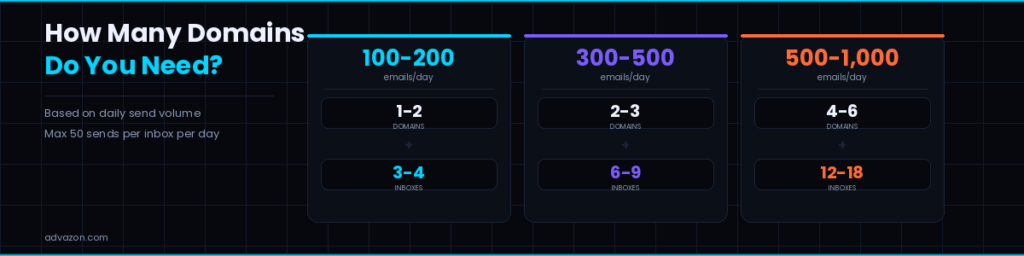
How many domains do you need?
Each domain supports 2 to 3 inboxes. Each inbox sends 30 to 50 emails per day maximum.
Google Workspace vs Microsoft 365 for Cold Email
Both work. Here is how they compare:
Google Workspace:
Microsoft 365:
Best practice: mix both. Use Google Workspace for 60% of inboxes and Microsoft 365 for 40%. This distributes your sending across two provider networks and reduces risk if one provider flags your volume.
SPF, DKIM, and DMARC
DNS authentication is the second pillar of cold email infrastructure. All three records must be correct before warmup begins.
SPF (Sender Policy Framework)
SPF tells receiving servers which IPs are authorised to send email from your domain.
For Google Workspace:
v=spf1 include:_spf.google.com ~all
For Microsoft 365:
v=spf1 include:spf.protection.outlook.com ~all
Start with ~all (soft fail). Move to -all (hard fail) after 4 weeks of verified clean sending.
Common SPF mistake: too many DNS lookups. SPF has a hard limit of 10 DNS lookups per evaluation. Exceed it and SPF fails silently on a percentage of every send. Use an SPF flattening tool if you have multiple includes.
DKIM (DomainKeys Identified Mail)
DKIM adds a cryptographic signature to every email. Receiving servers verify it using your public key stored in DNS.
Setup by provider:
Google Workspace: Admin Console → Apps → Google Workspace → Gmail → Authenticate email → Generate new record → Add TXT to DNS
Microsoft 365: Security Portal → Email and Collaboration → Policies → DomainKeys Identified Mail → Enable for your domain
Always use a 2048-bit key. Some spam filters score 2048-bit positively over 1024-bit.
DMARC (Domain-based Message Authentication)
DMARC ties SPF and DKIM together and tells receiving servers what to do when one fails.
Week 1 to 4 (monitoring):
v=DMARC1; p=none; rua=mailto:[email protected]; fo=1
Week 4 onwards (enforcement):
v=DMARC1; p=quarantine; pct=100; rua=mailto:[email protected]
Final state:
v=DMARC1; p=reject; pct=100; rua=mailto:[email protected]
Do not jump to p=reject immediately. Monitor reports first to confirm all legitimate sending is covered.
Verify All Three Before Moving On
Target: 10 out of 10 on Mail-Tester. Below 8 means something is misconfigured. Fix it before warmup starts.
Inbox Warmup
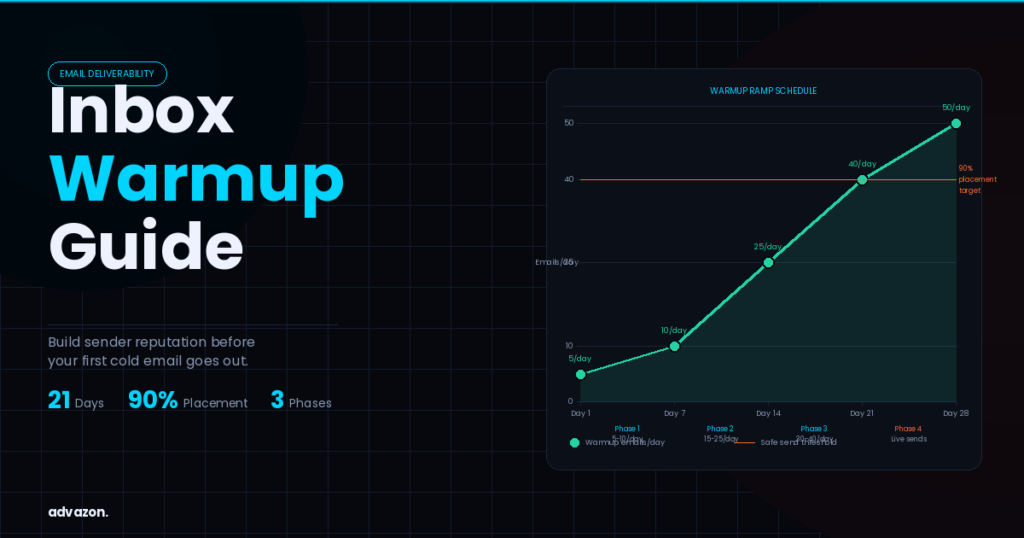
A new inbox has zero sender reputation. Warmup builds it by simulating real email behaviour before cold outreach begins.
Warmup schedule per inbox:
Days 1 to 7: 5 to 10 warmup emails per day, 100% reply rate from warmup network
Days 8 to 14: 15 to 25 warmup emails per day
Days 15 to 21: 30 to 40 warmup emails per day
Day 22 onwards: Begin real cold sends at 30 to 40 per day, scale by 5 per day each week
Smartlead vs Instantly for Warmup
Both are strong. Here is how they compare:
Smartlead:
Instantly:
We use Smartlead for all Advazon client campaigns. Either platform works if configured correctly.
3 warmup rules to never break:
Inbox Rotation and Sending Limits
A fully warmed inbox still has hard limits. Exceeding them triggers spam filters regardless of authentication quality.
Sending limits per inbox:
Inbox rotation means your sending tool automatically cycles across multiple inboxes so no single inbox carries too much volume.
Example setup for 300 emails per day:
Ongoing Monitoring
Cold email infrastructure is not a one-time setup. Domains age, IPs shift, blacklists update. You need monitoring to catch problems before they become campaign failures.
Set up Google Postmaster Tools for every sending domain. It gives you domain reputation, IP reputation, spam rate, and delivery error data directly from Gmail.
Check weekly:
Cold Email Infrastructure Pre-Launch Checklist (11 Steps)
Before sending the first cold email, confirm all of the following:
Do not skip step 9. A dirty list destroys domain reputation faster than almost anything else. Run every list through ZeroBounce before it enters any sequence.
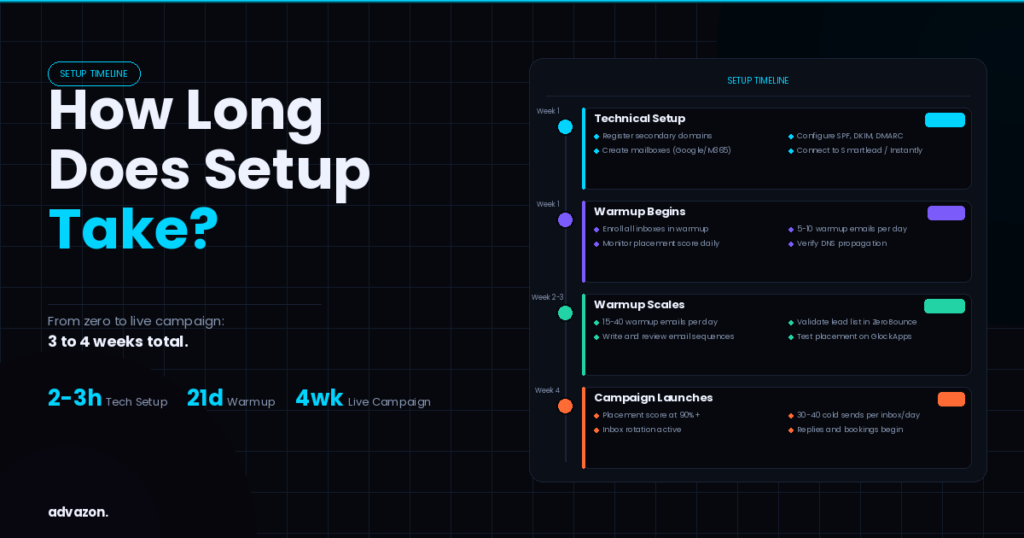
How Long Does Cold Email Infrastructure Setup Take?
Technical setup including domains, DNS records, and inboxes: 2 to 3 hours.
Warmup to safe sending level: 3 weeks minimum.
Total from zero to live campaign: 3 to 4 weeks.
At Advazon, infrastructure setup is completed in the first week of every engagement. By week 3 to 4, campaigns are live and booking calls.
If you are doing this yourself, budget a full day for the technical work and do not rush the warmup. The 3-week wait feels slow. Skipping it costs you the domain.
FAQs
What is a cold email infrastructure?
Cold email infrastructure is the technical setup that determines whether your outbound emails reach inboxes or go to spam. It includes secondary sending domains, mailbox configuration, DNS authentication records (SPF, DKIM, DMARC), inbox warmup, and sending rotation. Without it, even well-written cold emails fail to deliver.
Is cold email legal?
Cold email is legal in most countries when it follows applicable regulations. In the US, the CAN-SPAM Act applies. In the UK and EU, GDPR applies to email marketing but B2B cold email to work email addresses is generally permitted with legitimate interest basis. Always include an unsubscribe option and honour opt-out requests immediately.
What is the 30/30/50 rule for cold emails?
The 30/30/50 rule refers to subject line, email body, and follow-up split. 30% of your effort goes into the subject line, 30% into the opening line, and 50% into the follow-up sequence. The rule emphasises that most replies come from follow-up emails, not the first send.
How many emails can I send per day for cold outreach?
Each warmed inbox should send 30 to 50 emails per day maximum. To send 300 emails per day safely, you need 8 to 10 inboxes with inbox rotation configured. Sending 300 emails per day from one inbox will destroy your domain reputation within days.
Need your cold email infrastructure reviewed?
Book a free 30-minute audit with Advazon. We review your current setup, identify every gap in your SPF, DKIM, DMARC, warmup, and inbox configuration, and give you a specific fix plan. No pitch. No obligation.